
Digital asset management vs fixed asset management: same name, different product
Digital vs fixed asset management is a naming collision rather than a comparison. One manages image and video files, the other manages the equipment in your building. One manages files. One manages physical property. Organisations occasionally buy the wrong one, and discover it at implementation. Here is how to tell them apart in a sentence.
In this article
Digital vs fixed asset management: the short version
- Digital asset management organises files. Fixed asset management tracks physical property.
- The distinction: a digital asset can be in two places at once, a physical asset cannot.
- DAM cares about versioning, rights and findability. FAM cares about existence, custody and value.
- IT asset management straddles both. Splitting hardware and licences is fine if it is a decision.
- If your auditors raised an asset issue, fixed asset management is the category you need.
Same phrase, two entirely different products
Search for “asset management system” and you will get two categories of software that share nothing but a name.
Digital asset management (DAM) manages files. Images, video, logos, brand templates, marketing collateral. The problem it solves is that a marketing team has forty thousand images and no way to find the right one, know which version is current, or stop someone using a logo that was retired two years ago.
Fixed asset management (FAM) manages physical property. Laptops, vehicles, generators, furniture. The problem it solves is that a finance team has a register that says it owns things it cannot find, and does not include things it uses daily.
Both are called asset management. Neither substitutes for the other. Organisations occasionally buy one expecting the other, which is a bad week for somebody.
The distinction that makes them different
It comes down to what “the asset” is.
A digital asset is infinitely copyable and has no location. Two people can use the same image simultaneously and neither deprives the other. The governance problem is versioning, rights and findability: which file is current, who may use it, and where is it.
A physical asset is singular and has a location. Only one person can have the laptop. If it is in Mombasa it is not in Nairobi. The governance problem is existence, custody and value: does it still exist, who has it, and what is it worth now.
Everything else follows from that. Digital asset systems care about file formats, metadata, permissions and expiry. Fixed asset systems care about tags, locations, custodians, depreciation and disposal.
Side by side
| Digital asset management | Fixed asset management | |
|---|---|---|
| What it tracks | Files: images, video, documents, brand assets | Physical property: equipment, vehicles, furniture, plant |
| Core problem | Findability, versioning, usage rights | Existence, custody, valuation |
| Unique identifier | File ID and metadata | Asset number on a physical tag |
| Who owns it | Marketing, brand, creative | Finance, operations, administration |
| Key operation | Search, preview, download, permission | Scan, transfer, depreciate, dispose |
| What “lost” means | Cannot be found in the system | Cannot be found in the building |
| Audit interest | Licence compliance and rights | Existence, completeness, valuation |
| Physical component | None | Tags, verification walks, scanners |
Where the confusion causes real problems
Buying the wrong thing
Usually because a search for “asset management software” surfaced whichever category had the better marketing budget. The failure is discovered at implementation, when someone asks where to record the acquisition cost and nobody can find the field.
IT asset management, which is neither and both
ITAM sits awkwardly between them. A laptop is a physical asset with a location and a custodian. The software licence on it is not physical but is also not a creative file. Many organisations end up with the hardware in the fixed asset register and the licences in a separate system, which is a reasonable answer as long as it is a decision rather than an accident.
Assuming one register can hold everything
It cannot, and trying produces a system that does neither job. Keep them separate and connect them only where there is a genuine relationship, such as a document attached to an asset record.
See the asset management system in action
Book a focused demonstration using your own workflow questions, including registers, custodians, transfers, audits and depreciation. Book an AMS demo →
Which one you actually need
You need digital asset management if your problem sounds like: nobody can find the current logo, we keep using outdated photography, we do not know which images we are licensed to use, or three versions of the same brochure are in circulation.
You need fixed asset management if your problem sounds like: we cannot prove an asset exists, our register does not reconcile to the ledger, we do not know who has which laptop, depreciation is maintained by hand, or the auditors raised a fixed asset point.
If both sound familiar, you need both, from different vendors, owned by different teams. That is normal rather than a failure of consolidation.
A quick test
Ask whether the thing you want to track can be in two places at once. If yes, that is a digital asset. If no, it is a fixed asset and it needs a tag.
What a fixed asset system has to do
Since that is our side of the line, it is worth being specific about what the category should include:
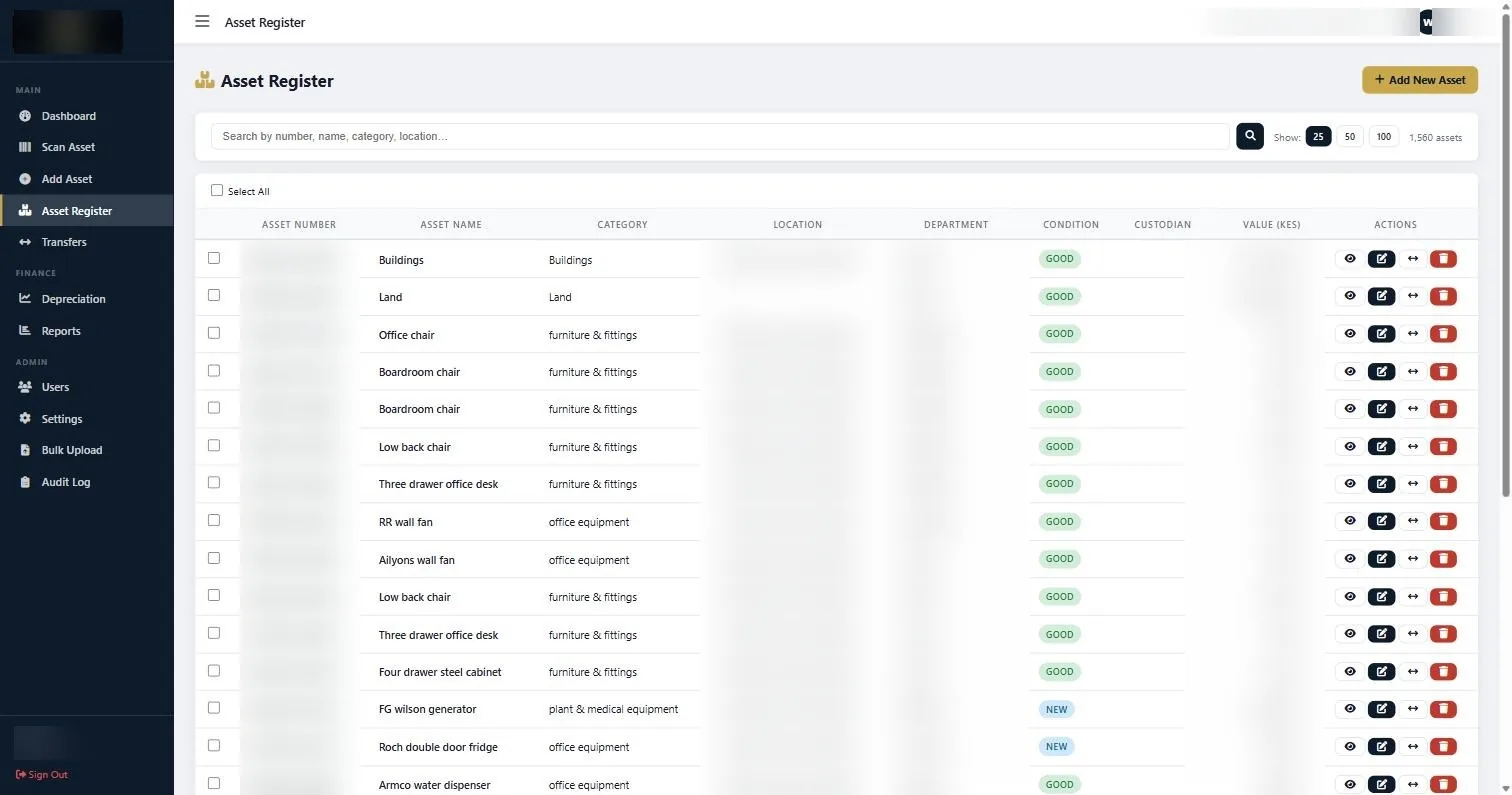
- An asset register with enough fields per asset to answer finance, operations and audit questions.
- Scanning, so a physical item resolves to its record without typing.
- Transfers logged between locations, departments and custodians, with dates.
- Depreciation calculated per asset by category, with schedules you can export.
- Disposal recorded as a transaction rather than a deleted row.
- Bulk import, because you will start from an existing register.
- Reporting that exports in formats you can actually work with.
Our asset management system covers these with nineteen capture fields, a barcode Scan Asset screen and twelve report types. What makes it work is not the software but the tagged, verified register underneath it, which is why verification comes first.
Common questions about digital vs fixed asset management
What is the difference between digital asset management and fixed asset management?
Digital asset management organises files such as images and video, solving findability, versioning and usage rights. Fixed asset management tracks physical property, solving existence, custody and valuation. They share a name and nothing else.
Can one system manage both digital and fixed assets?
In principle, but in practice a system that tries usually does neither well. The data models are fundamentally different: digital assets are copyable and have no location, physical assets are singular and do. Most organisations that need both run two systems.
Where does IT asset management fit?
Between the two. The hardware is a physical asset with a location and custodian and belongs in the fixed asset register. Software licences are not physical and are usually tracked separately. Splitting them is fine as long as it is a deliberate decision.
Which one do I need if my auditors raised an issue?
Fixed asset management. Audit findings on assets are about existence, completeness and valuation of physical property, which is not something a digital asset system tracks at all.
Do digital assets need tagging?
Not physically. They are identified by metadata inside the system. Physical tags exist precisely because a physical asset has no way of announcing its own identity, which is the problem tagging solves.
What should a fixed asset management system include?
An asset register with sufficient fields per asset, barcode scanning, transfer logging with dates, per-asset depreciation with exportable schedules, disposal recorded as a transaction, bulk import, and reporting that exports to formats you can use.
If a search for digital vs fixed asset management brought you here, the quick test is what you are trying to count. Files means digital. Chairs, laptops and machinery means fixed.
Continue with the right next guide
See the asset management system in action
Book a focused demonstration using your own workflow questions, including registers, custodians, transfers, audits and depreciation.