
How to run a depreciation report
Before you run a depreciation report, the register has to be right, because the report simply calculates on whatever cost and date fields are already sitting there. The depreciation schedule is the report your auditor will ask for first. This guide covers how to produce it, what the difference between the schedule and the summary actually is, and the handful of data problems that make the numbers look wrong.
Before you start
- Assets in the register with a purchase cost and a purchase date. Assets missing either will not depreciate.
- Depreciation rates or useful lives agreed with your accountant and set against your categories.
- A clear view of your financial year end, because that is what the quarterly reports are anchored to.
How to run a depreciation report, step by step
-
Check the depreciation setup before you run anything
Open Depreciation under Finance. This is where the rates and methods that drive the numbers live. Confirm the method and rate against each category before you produce a report for anyone else to read.
Depreciation policy is an accounting decision, not a system decision. If you are unsure what rate to apply to a category, ask your accountant rather than accepting the default. The system will calculate correctly on whatever basis you give it, including a wrong one.
-
Open Reports and choose the finance report you actually need
Go to Reports. The left panel groups reports into Asset Reports, Movement Reports and Finance Reports. The four you care about here sit under Finance Reports.
Depreciation Schedule is the line by line report: every asset, its cost, its accumulated depreciation and its net book value. This is the working document, and it is what an auditor will want to sample from.
Depreciation Summary aggregates the same information. This is what goes in front of a board or into a management pack.
Quarterly Depreciation Schedule and Quarterly Depreciation Summary are the same two reports cut to quarters, for organisations that report quarterly rather than only at year end.
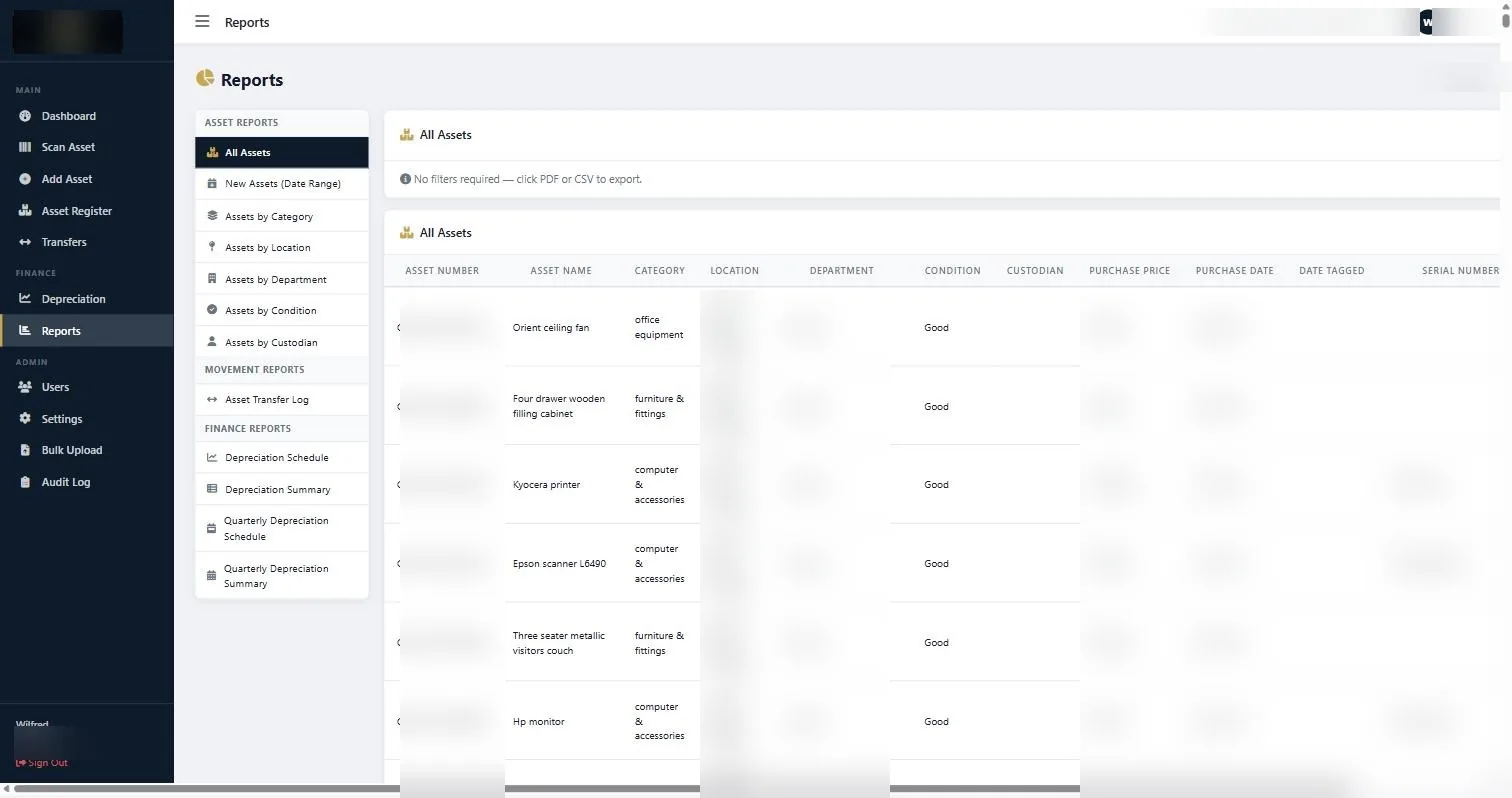
The Reports screen. Finance Reports sit in the lower group of the left panel; exports are available as PDF or CSV. -
Run the report and read the top line first
Select the report and run it. Before you look at any individual asset, check three totals: total cost, total accumulated depreciation, and total net book value.
If total accumulated depreciation exceeds total cost, something is wrong with a useful life or a date. If net book value is suspiciously round, or identical to cost, the depreciation has probably not run because dates or costs are missing.
-
Export as CSV for working, PDF for sharing
Both formats are available directly from the report. Use CSV when you need to reconcile against the general ledger, because you will want to sort and pivot. Use PDF when you are sending the report to an auditor, a board or a funder, because it will not be silently edited in transit.
Name the export file with the report type and the date it was produced. Six months later, an untitled export is worthless.
-
Reconcile against the ledger
Take the CSV, group by category, and compare each category total against the corresponding fixed asset account in your general ledger.
Differences almost always come from one of four places: assets bought but never entered, assets disposed of but never removed, assets sitting in the wrong category, or costs entered net of VAT in one place and gross in the other. Work through them in that order.
-
Record what you found
Whatever the reconciliation surfaced, fix it in the register rather than in a side spreadsheet. The moment you start keeping a correction list outside the system, the register stops being the record.
If something does not look right
| What you are seeing | Why | What to do |
|---|---|---|
| An asset shows zero depreciation | Purchase cost, purchase date, or the category rate is missing. | Open the asset and complete the financial fields. Then check the category has a depreciation method and rate set. |
| Net book value is negative | Useful life or rate is set so that the asset over-depreciates. | Correct the rate against the category. Net book value should stop at residual value, not run past it. |
| Totals do not match the ledger | Additions or disposals recorded in one place and not the other. | Reconcile category by category rather than asset by asset. The gap is usually concentrated in one or two categories. |
| The report is missing recent purchases | The assets were bought but never entered. | This is the most common finding of all. Fix the process for recording additions, not just the individual records. |
Worth knowing
- Run the schedule monthly rather than only at year end. Problems found in month two cost minutes; the same problems found in month twelve cost days.
- Export to CSV and keep a dated copy each period. It gives you a defensible history of what the register said and when.
- Depreciation rates belong to your accountant. The system applies them, it does not decide them.
- If an asset is fully depreciated but still in use, it stays in the register. A net book value of zero is not a reason to delete a record.
Common questions about run a depreciation report
What is the difference between the schedule and the summary?
The schedule lists every asset individually. The summary aggregates. Auditors sample from the schedule; boards read the summary.
Can I run depreciation for a single department?
Run the schedule and filter or group the CSV export by department. The asset reports also break down by department if you need a standalone view.
Which depreciation method should we use?
That is your accountant’s call and it usually follows the class of asset. Straight line is the common default for furniture, equipment and fittings; reducing balance is used for classes that lose value fastest in early years, such as vehicles and IT.
Do fully depreciated assets stay on the report?
Yes, at their residual value, for as long as they are in use. Removing them would hide assets the organisation still holds.
Why does our depreciation not match last year’s spreadsheet?
Usually because the spreadsheet was carrying assets that no longer exist, or was missing recent additions. Reconcile the asset list first, then the numbers.
Can our auditor pull these reports themselves?
Yes, with a read-only account. It removes an entire round of email during fieldwork.
If the figures look wrong the first time you run a depreciation report, check the acquisition dates and costs before you question the method. It is almost always the data.
Related guides
Ready to get your assets under control?
Call us to discuss your organisation, or email your asset list and we’ll scope it for you.