
How to set up your STL Asset Management System account
Asset management system setup is mostly about getting four things right before you load a single asset, because every one of them is painful to change later. The first hour in a new asset system decides how useful it will be for the next five years. This guide covers the order to do things in: settings first, then categories and locations, then people, then assets. Doing it the other way round is what creates registers nobody trusts.
Before you start
- Your login details. STL creates the first Super Admin account for you and sends the credentials directly to the person you nominate.
- Your list of sites, buildings or branches, however rough. You can add more later, but starting with the real list saves re-tagging work.
- Your department list as finance recognises it, not as the org chart draws it. The register has to reconcile to the accounts.
- An asset numbering convention, or a willingness to use ours. There is a section on this below.
Asset management system setup, step by step
-
Sign in and change the password immediately
Open the system in a browser and sign in with the credentials STL sent you. The first thing to do, before anything else, is change the password. The initial credentials pass through email at least once, so treat them as temporary by default.
If your organisation has a password policy, apply it here. If it does not, the practical minimum for a system holding your asset values and locations is a long unique passphrase that is not reused anywhere else.
-
Learn the layout before you touch anything
The left navigation is grouped into three blocks and the grouping tells you who each part is for.
Main holds Dashboard, Scan Asset, Add Asset, Asset Register and Transfers. This is the day to day block, the one storekeepers and administrators live in.
Finance holds Depreciation and Reports. This is where the register turns into numbers your accountant and auditor can use.
Admin holds Users, Settings, Bulk Upload and Audit Log. This is the configuration block, and in most organisations only one or two people should be working in it.
The Dashboard itself is a summary: total assets, additions this month, transfers this month, system users, and breakdowns by condition, category, location and department. On day one it will be empty. That is expected.
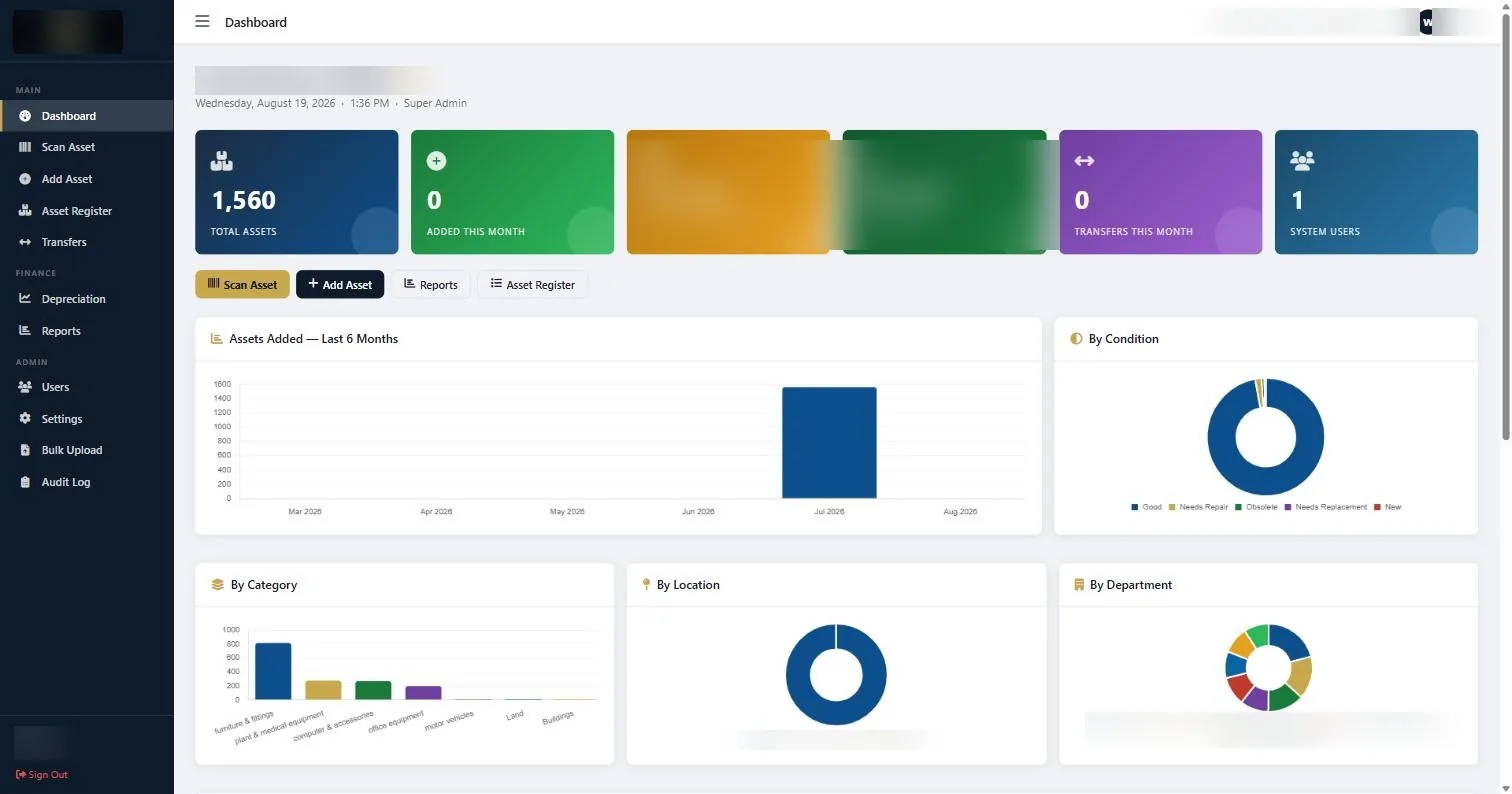
The dashboard after a register has been loaded. On a new account every tile reads zero until you add assets. -
Set up categories, locations and departments in Settings
Go to Settings and build out your reference lists before you add a single asset. Categories, locations and departments are the three that matter most, because every asset you create afterwards has to be filed against them.
Keep categories at the level your accounts use: furniture and fittings, computer and accessories, office equipment, plant and medical equipment, motor vehicles, land, buildings. Resist the urge to create thirty categories. Categories drive the depreciation rates and the finance reports, so a category that finance does not recognise is a category that will cause an argument later.
Locations should be physical places a person can walk to. If a location is so broad that finding an asset inside it still takes twenty minutes, it is too broad. Split it.
Departments should match the cost centres in your accounts. This is the field that lets you tell a head of department exactly what they are responsible for.
-
Agree your asset numbering convention
The asset number is the one field you cannot casually change later, because it is printed on the physical tag. Decide the format now.
A convention that works well in practice has three parts: a short category or department code, a sequence number, and nothing else. Something like
IT/0142orFUR/0871. Keep it short enough to read aloud over a phone.Two things to avoid. Do not encode the location in the asset number, because assets move and you will end up with a tag that lies. Do not encode the year of purchase either, for the same reason people regret encoding it in staff numbers.
If you are having STL print your tags, tell us the convention at quoting stage. We print to your scheme.
-
Create the users who will actually do the work
Open Users and add the people who need access. Add real named accounts rather than a shared one. A shared login makes the Audit Log worthless, and the Audit Log is the thing that answers the question of who moved that projector.
Give each person the narrowest access that lets them do their job. The person doing verification rounds needs Scan Asset and Asset Register. They do not need Settings.
-
Load your existing assets
You have two routes. If you already hold a spreadsheet of assets, use Bulk Upload and bring them in as a batch. If you are starting from nothing, or the spreadsheet is too unreliable to trust, add assets individually as they are physically tagged.
Most organisations do both: bulk load what is already known, then correct it against reality during the first physical verification. Be honest about which of your existing records have ever been verified. Loading an unverified spreadsheet and calling it a register is how organisations end up with a system that is precisely wrong.
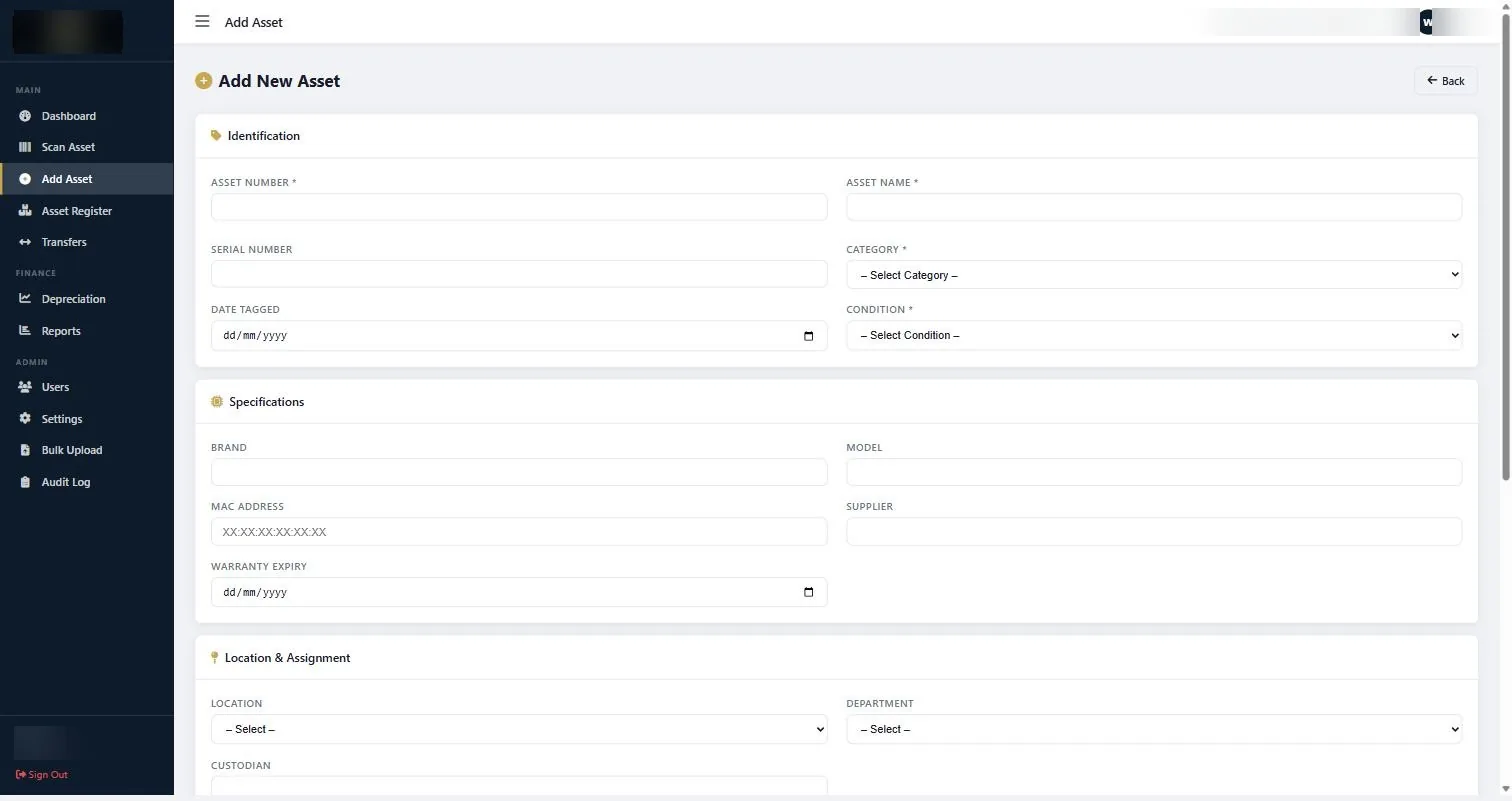
The Add Asset form. Asset number, name, category and condition are required; the rest can be filled in as it becomes known. -
Run one report and check it against something you know
Before you declare the setup finished, open Reports, run All Assets, and export it. Then pick a room you can walk to and compare the report against what is physically in it.
This takes twenty minutes and it is the single most valuable thing you can do at setup. Every gap you find now is a gap you would otherwise have found during an audit.
If something does not look right
| What you are seeing | Why | What to do |
|---|---|---|
| The dashboard shows zero assets | Nothing has been added yet, or the assets were added under a different account. | Open Asset Register directly. If records are listed there but the dashboard is empty, refresh the page; the tiles read on page load. |
| A category is missing from the Add Asset drop-down | Categories come from Settings, not from free text. | Go to Settings, add the category, then return to the form. The drop-down will pick it up. |
| Two assets have the same asset number | Usually a bulk upload that ran twice, or two people numbering in parallel. | Decide which record is real, correct the duplicate, and re-tag the physical item if the tag is wrong. Never leave two live records sharing a number. |
| You cannot see Settings or Users | Your account does not have admin access. | Ask whoever holds the Super Admin account to raise your access, or to make the change for you. |
Worth knowing
- Set up categories and locations before you add assets, not after. Re-filing two thousand assets is a bad afternoon.
- One named account per person. Shared logins destroy the value of the Audit Log.
- Fill in Serial Number wherever the asset has one. It is the field that resolves arguments when a tag falls off.
- The register only stays accurate if additions go in as they are bought. Agree who does that, and when, before you finish setup.
Common questions about asset management system setup
How long does setup actually take?
Configuration takes under an hour. Loading assets takes as long as your data takes. If you have a clean spreadsheet, a bulk upload is minutes. If you are starting from a physical verification, allow for the tagging exercise itself, which is measured in days per site rather than hours.
Can we change our asset numbering later?
You can change the numbers in the system easily. The problem is the physical tags, which then all have to be replaced. Treat the numbering decision as permanent and get it right at the start.
Do we need to tag everything before we start using the system?
No. The system is useful from the first asset you enter. Most organisations tag site by site or department by department, and the register grows as the tagging progresses.
Who should own the register?
One named person, usually in finance or administration, with a named backup. Registers that are everybody’s responsibility drift within a year.
Can our auditor be given access?
Yes. Create a user account for them with read access to the register and reports. It is far faster than emailing exports back and forth during fieldwork.
What happens to our old spreadsheet?
Keep it, read only, as a historical record. Do not maintain both. Running a spreadsheet alongside the system is how you end up with two registers that disagree.
If you would rather not do the asset management system setup yourself, we configure the account, load your register and hand it over ready to use.
Related guides
Ready to get your assets under control?
Call us to discuss your organisation, or email your asset list and we’ll scope it for you.