
Asset tagging for IT equipment: placement, tag type and keeping it current
Asset tagging for IT equipment has a problem the rest of the estate does not: the assets are portable, valuable, frequently reassigned and often replaced inside three years. IT is where asset registers drift first, because the equipment moves faster than the paperwork. Here is where to put the tag, what to capture, and how to stop reassignment from breaking the record.
In this article
Asset tagging for IT equipment: the short version
- IT registers drift because equipment is reassigned constantly and nothing forces a record update.
- Tag placement matters: flat, visible, away from vents, heat and anything replaceable.
- Self-adhesive suits most IT. Acetone-activated for high-value portable kit, aluminium for industrial settings.
- Capture the serial number as well as your own asset number. They serve different purposes.
- Make logging a transfer a ten-second scan, and verify by department quarterly rather than all at once annually.
Why IT equipment is the hardest category to keep accurate
IT equipment is where asset registers fail first, and it fails for reasons that have nothing to do with negligence.
It moves. A laptop is issued, reassigned, taken home, swapped during a repair, returned from a leaver and reissued to someone else, all inside a year. Every one of those events changes the truth and none of them naturally triggers a register update.
It also depreciates faster than anything else you own, which means the gap between book value and reality widens quickly. And it is the category most likely to leave the building without anyone deciding it should.
None of this is solved by trying harder. It is solved by making the asset itself carry its identity, so that a physical check takes seconds rather than detective work.
What to tag, and where to put the tag
| Equipment | Where the tag goes | Why there |
|---|---|---|
| Laptops | Base, or the palm-rest edge | Flat, visible when opened, away from vents and hinges |
| Desktops | Front bezel or top of the case | Readable without moving the machine or crawling under a desk |
| Monitors | Back panel near the stand, or the stand base | Flat, stable, does not interfere with mounting |
| Printers and copiers | Front or side panel, not a door | Doors get opened, replaced and swapped between units |
| Servers and network gear | Front face, plus a duplicate on the rear | Rack-mounted kit is often only reachable from one side |
| Projectors | Base plate | Ceiling-mounted units need the tag where a ladder can reach it |
| Phones and tablets | Rear, or inside a fitted case | Balance visibility against the tag being peeled off |
| UPS and power equipment | Front panel | Often floor-level and behind other equipment |
Two placement rules that save trouble later. Do not tag anything that gets replaced independently of the asset: not the battery, not a removable panel, not the case a tablet lives in this month. And do not tag a surface that runs hot or gets wiped daily, because adhesive chemistry has limits.
Which tag type for IT
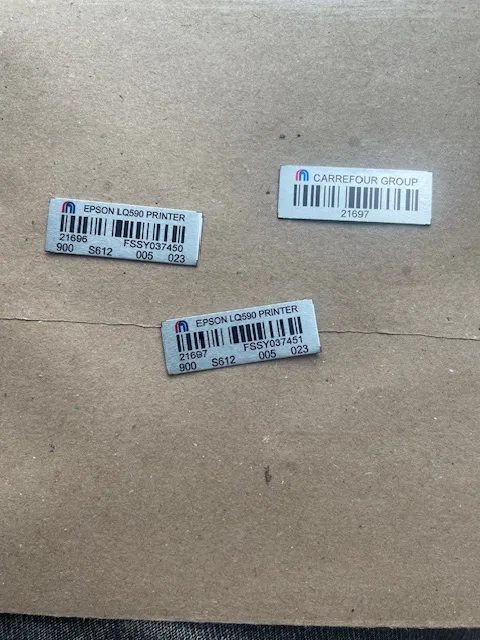
Most IT equipment takes a self-adhesive tag: smooth indoor surfaces, climate controlled, low physical wear. It is the cheapest option, applies fastest at volume, and lasts years in an office.
Two exceptions worth planning for:
- Acetone-activated tags for high-value portable equipment, kit in shared or public-facing spaces, or anywhere you want removal to be evident. These bond into the surface rather than sitting on adhesive.
- Anodised aluminium where IT equipment lives somewhere industrial: a workshop, a plant room, a site office. If your laptops live in a workshop rather than an office, they need a workshop specification.
The asset tags page covers all four types and where each belongs.
What to capture, beyond the asset number
The tag carries the asset number. Everything else lives in the register, and for IT there are a few fields worth insisting on:
- Serial number. Not the same as the asset number. The serial is the manufacturer’s identity and it is what you will need for warranty, insurance and a police report. Capture both.
- Custodian. Who currently holds it. This is the field that goes stale fastest and the one that matters most.
- Location and department. Where it should be, so a discrepancy is visible.
- Acquisition date and purchase price. For depreciation and for replacement planning.
- Condition. So the refresh cycle is driven by something other than complaints.
Our asset management system captures nineteen fields per asset and logs transfers between custodians, locations and departments with a date on each, which is the part a spreadsheet cannot do.
Plan your asset tagging project
Send us your approximate asset count and locations and we will recommend the right tag, register structure and rollout plan. Request an asset tagging quote →
The reassignment problem, and how to actually fix it
The single biggest source of IT register drift is reassignment without a record. Someone leaves, their laptop goes to someone else, and the register still says it belongs to a person who no longer works there.
Three things fix this, in order of effectiveness:
1. Make the transfer take ten seconds
If logging a transfer means opening a spreadsheet, finding the row, editing a cell and saving without conflicting with someone else’s copy, it will not happen. If it means scanning the tag and picking a new custodian, it will.
2. Tie it to the offboarding checklist
Equipment return is already on that list. Add the scan. The moment of return is the only moment when everyone involved knows exactly what is being handed over.
3. Verify on a cycle, not on a crisis
A quarterly walk-through scanning tags in one department takes an hour and catches drift while it is still small. An annual all-hands count catches a year of accumulated errors at once, which is why nobody enjoys it and why the results are never fully trusted.
Common mistakes with IT asset tagging
Using the serial number as the asset number
Tempting, because it is already unique. The problem is that serial formats vary wildly between manufacturers, they are long, and they tell you nothing about where the asset belongs. A scheme like IT/LAP/0142 is readable to a human, sortable, and consistent across vendors. Keep the serial as a separate field.
Tagging only what is above the capitalisation threshold
Monitors, docks, keyboards and adapters often sit below it, and collectively represent real money that quietly gets replaced over and over. Tag them and flag them as non-capitalised.
Printing the department on the tag
The department changes. The tag does not. Put the asset number on the tag and let the register hold everything that moves.
Tagging before verifying
The register you have is not the equipment you have. Confirm what physically exists first, then print. This is the sequence we used across 20-plus branches for Kenya Dairy Board and seven branches for Thika Water and Sewerage Company.
Common questions about asset tagging for IT equipment
Where should an asset tag go on a laptop?
The base or the palm-rest edge. Both are flat, both stay readable, and neither interferes with vents, hinges or the screen. Avoid the battery and any removable panel, since those get replaced independently of the machine.
Should I use the serial number as the asset tag number?
No. Serial formats differ by manufacturer, they are long, and they carry no information about where the asset belongs. Use your own scheme on the tag and store the serial as a separate register field. You need both for different reasons.
Will asset tags damage IT equipment or void a warranty?
Standard self-adhesive tags applied to an external surface do not affect warranty. Acetone-activated tags bond into the surface and will mark it, so those are specified deliberately for high-risk equipment rather than applied by default.
Do I need to tag monitors, keyboards and docking stations?
Monitors and docks, yes. They hold real aggregate value and go missing quietly. Keyboards and mice are usually treated as consumables. The line depends on your replacement costs rather than on your capitalisation policy.
How do we keep the register current when laptops get reassigned?
Make logging a transfer a ten-second scan rather than a spreadsheet edit, attach it to the offboarding checklist, and run short departmental verification walks quarterly rather than one large annual count.
Can asset tags be removed if we sell or dispose of equipment?
Self-adhesive tags can be removed, though they may leave residue. Acetone-activated tags cannot be removed cleanly, which is the point of using them. Either way the disposal should be recorded in the register so the asset is written off rather than quietly vanishing.
Set custody at the individual level for asset tagging for IT equipment, always. A laptop assigned to a department is a laptop nobody is answerable for.
Continue with the right next guide
Plan your asset tagging project
Send us your approximate asset count and locations and we will recommend the right tag, register structure and rollout plan.