
Barcode vs QR code asset tags: which one should you actually use?
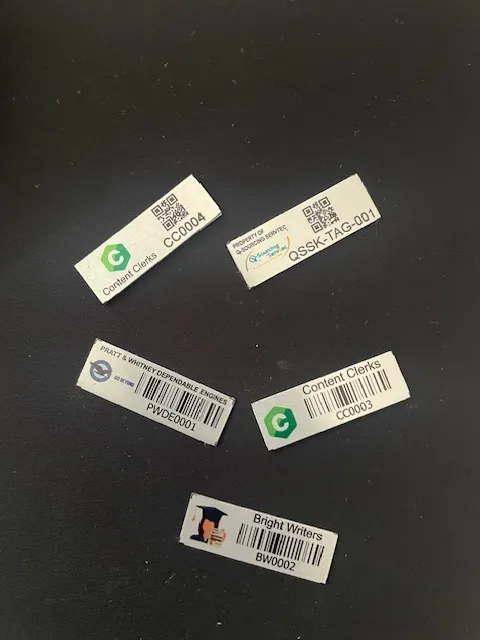
Barcode vs QR code asset tags is usually settled by two practical things: how much space the tag has, and whether anybody will ever scan it with a phone. Both formats work. They fail in different ways, scan at different speeds and fit different tags. Here is how to pick without guessing.
In this article
Barcode vs QR code asset tags: the short version
- Barcodes scan faster in bulk and fit narrower tags, which suits large indoor registers and routine verification.
- QR codes hold more data and read on any phone, which suits distributed equipment and third-party servicing.
- Both cost the same to print. The decision is about workflow, not budget.
- Mixing formats across asset classes is normal and causes no problems in the register.
- Tag material determines whether a tag survives. That decision matters more than the code format.
What the two formats actually are
A barcode and a QR code both do the same basic job: they turn a string of characters into a printed pattern a machine can read faster and more accurately than a human can type it. The difference is in how much they hold and what reads them.
A standard 1D barcode, the striped kind you see on a supermarket shelf, encodes a single line of data. In asset tagging that line is almost always the asset number: something like THW/ELEC/BR/3013. It is short, it is unique, and it points at a row in your register. Everything else about the asset lives in the register, not on the tag.
A QR code is two-dimensional. It reads in both directions, which means it holds far more: a few hundred characters comfortably, and in theory a few thousand. That is enough for an asset number plus a description, a location, a URL, or all of the above.
The instinct is to assume more data is better. In fixed asset management it usually is not, and understanding why is the whole decision.
The case for barcodes
They scan faster in bulk. A laser or CCD barcode scanner locks onto a 1D code almost instantly and does not need to be squared up. When you are walking a floor verifying four hundred assets in an afternoon, that difference compounds. A physical audit done with barcode scanners moves at a pace a camera-based workflow does not match.
They print smaller. A readable 1D barcode fits on a narrow strip. That matters more than people expect. A laptop bezel, a monitor stand, the edge of a filing cabinet drawer: these are the places a tag actually has to live, and a square QR code often will not sit there without wrapping or overhanging.
They tolerate wear better. Both formats have some error correction, but a barcode degrades gracefully in one direction. Scuff the top or bottom edge of a 1D code and the scanner still reads the middle. Damage a QR code’s finder patterns, the three squares in the corners, and it stops resolving at all.
They are cheaper to work at scale. Not the tag itself, which costs the same, but the operation. Barcode scanners are inexpensive, they do not need a data connection, and they do not depend on whoever is holding them having a phone with a working camera and enough battery.
The case for QR codes
Anyone can read them. No dedicated hardware. A department head who wants to know what a machine is can point their phone at it. That is genuinely useful in an organisation where the people who encounter assets are not the people who manage the register.
They carry context. A QR code can hold the asset number, the description, the department and the acquisition date at once. If your register is ever unavailable, the tag still tells you something.
They can point at a page. Encode a URL and scanning the tag opens a record, a manual, a maintenance log or a fault reporting form. For equipment that gets serviced by third parties, this is the strongest argument for QR.
They survive partial damage. QR codes carry Reed-Solomon error correction and at the higher levels can lose up to about 30 percent of their area and still resolve, provided the finder patterns are intact.
Side by side
| 1D barcode | QR code | |
|---|---|---|
| Data held | Asset number only, typically 10 to 20 characters | Several hundred characters, or a URL |
| Reader | Barcode scanner | Barcode scanner or any smartphone camera |
| Speed in bulk audits | Fastest | Slower, needs framing and focus |
| Minimum practical tag size | Narrow strip, fits bezels and edges | Needs a square footprint |
| Damage tolerance | Degrades gradually along one axis | High, until a finder pattern goes |
| Works offline | Yes | Yes, unless it encodes a URL |
| Best for | Large registers, routine verification, IT and furniture | Field equipment, third-party servicing, self-service lookups |
Both formats cost the same to print on the same tag material. The choice is about the workflow, not the budget.
Not sure which tag belongs on each asset?
Send a short asset list and a few photos of the surfaces and environment. We will recommend the right tag material and code type. Send your asset list →
How we decide on a real project
In practice the split is not ideological. It comes down to who scans the tag and how often.
For Kenya Dairy Board, where the job was verifying and tagging more than 5,000 assets across 20-plus branches, throughput mattered most. Barcodes on a scanner move a verification exercise of that size in a way a phone camera does not.
For Thika Water and Sewerage Company, we specified QR on a portion of the estate. Water utility equipment is distributed, it is serviced by field teams, and the people who encounter a pump are not sitting at the desk with the register open. Being able to lift a phone and identify the asset on the spot changed how useful the tag was.
Plenty of estates end up mixed, and that is fine. The register does not care which format the tag carries as long as the code resolves to the right asset number.
The one rule worth holding
Whichever format you choose, the code should encode the asset number and nothing that will go stale. A tag that encodes a department will be wrong the first time the asset moves. The register handles change. The tag should just say which asset this is.
What the tag is made of matters more than the code on it
Organisations spend a lot of energy on the barcode versus QR question and almost none on the substrate, which is where tags actually fail. A perfectly chosen QR code printed on the wrong material will be illegible in eight months.
The four materials we work with, and where each belongs:
- Anodised aluminium. Rigid metal, for plant, machinery, vehicles and anything outdoors or exposed to heat, solvents or heavy handling.
- Self-adhesive. The everyday workhorse for IT equipment, office furniture and indoor fittings.
- Acetone-activated. Bonds into the surface rather than sitting on it. Used where tags must not be peeled off, whether by wear or by intent.
- Polyester. Flexible and washable, for soft furnishings: mattresses, carpets, curtains and upholstery. Hotels and hospitals need these and a rigid tag simply will not work.
We go through all four in more detail on the asset tags page.
So which should you choose?
If most of your assets sit indoors, your register runs into the thousands, and verification is done by a small team doing rounds, choose barcodes. The speed advantage is real and the tag fits places a QR code will not.
If your assets are distributed, serviced by people outside your finance team, or you want anyone with a phone to be able to identify something, choose QR.
If you are somewhere in between, which most organisations are, mix them by asset class. That is not a compromise, it is the correct answer.
What matters far more than either choice: that every tag is unique, that it maps to a verified register entry, and that the material survives where the asset lives. Get those three right and the format is a detail.
Common questions about barcode vs QR code asset tags
Can one asset register hold both barcode and QR tags?
Yes. The register stores the asset number. Whether that number arrived from a laser scanner reading a 1D barcode or a camera reading a QR code makes no difference to the record. Mixed estates are common and cause no problems.
Do QR asset tags need an internet connection to work?
Only if the QR code encodes a web address. If it encodes the asset number and description directly, which is how we normally set them up, it reads offline on any device.
Which format lasts longer outdoors?
Neither format is inherently more durable. Longevity comes from the tag material and the printing method. An anodised aluminium tag will outlast a paper label by years regardless of whether it carries a barcode or a QR code.
Is a QR code more secure than a barcode?
No. Both are open formats that anyone with a scanner can read. Neither is a security control. Security comes from the register and who has access to it, not from the pattern printed on the tag.
Do I need special software to use QR asset tags?
You need something that turns a scan into a register lookup. Our asset management system does this from a barcode scanner or a connected reader, and the same asset number resolves regardless of the format it came from.
How small can an asset tag be and still scan?
For 1D barcodes we can go down to a narrow strip suitable for laptop bezels and monitor stands. QR codes need a square footprint and more area to stay reliable, which is one of the main practical reasons estates with a lot of small IT equipment lean towards barcodes.
If you are choosing barcode vs QR code asset tags for a mixed estate, you do not have to pick one. Use the narrow format where space is tight and the square format where a phone will do the scanning.
Continue with the right next guide
Not sure which tag belongs on each asset?
Send a short asset list and a few photos of the surfaces and environment. We will recommend the right tag material and code type.