
Every asset you own, on one screen.
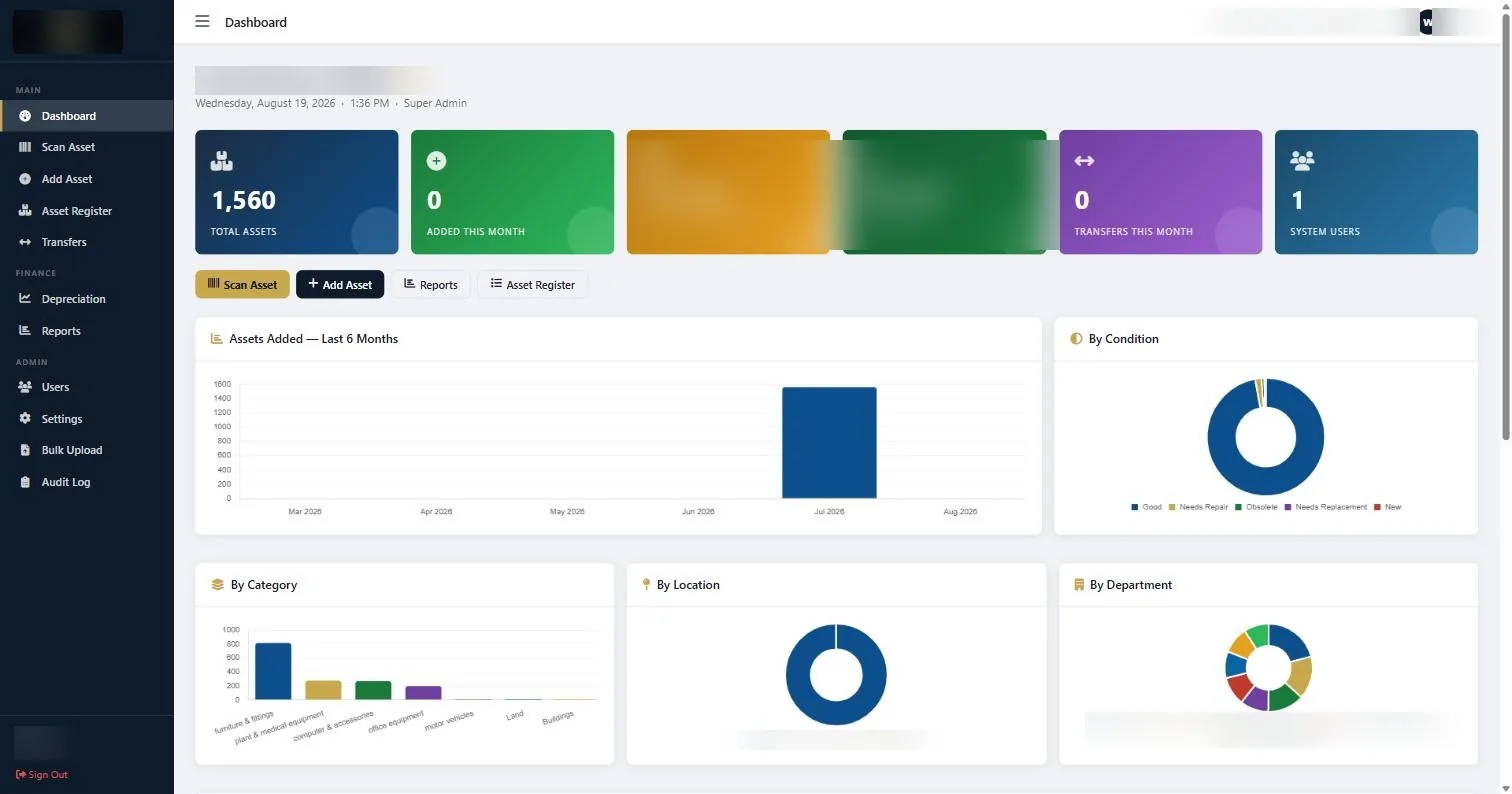
An asset management system earns its place the day two people need to change the same record and both changes have to survive. A fixed asset management system built around a scannable register: live asset counts, net book value, automatic depreciation schedules, transfer tracking and twelve export-ready reports. One-time licence, no monthly fee. In use across Kenya and the wider region.
What is a fixed asset management system?
A fixed asset management system holds the definitive record of every physical asset an organisation owns: what it is, where it is, who is responsible for it, what it cost, what it is worth today and what has happened to it since purchase. It replaces the spreadsheet that one person maintains and everyone else quietly distrusts.
It works hand in hand with asset tagging. The tag gives each item a unique, scannable identity in the physical world. The system is where that identity connects to financial and operational data. Tagging without software gives you an accurate register that starts going stale immediately. Software without tagging gives you a database with no reliable way to confirm the assets actually exist.
Ours is a one-time licence rather than a subscription, which for most organisations in this region works out considerably cheaper over any realistic time horizon.
Asset management system modules
Ten modules, grouped the way the people using them actually work: day-to-day asset operations, finance, and administration.
| Module | Group | What it does |
|---|---|---|
| Dashboard | Main | Live totals: asset count, additions this month, total purchase cost, current net book value, transfers this month, and breakdowns by condition, category, location and department |
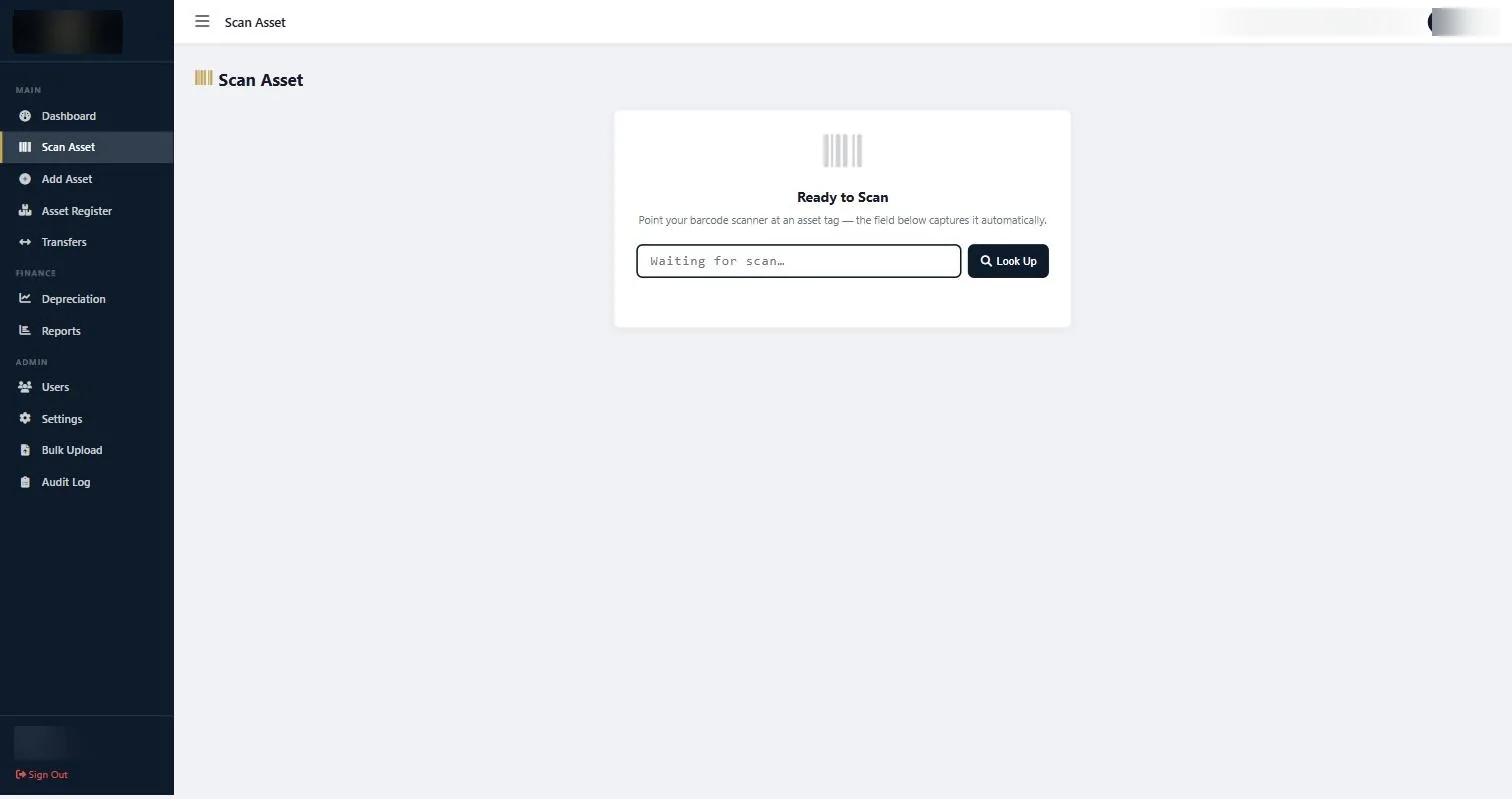
| Scan Asset | Main | Scan a tag with a barcode reader and the asset record opens immediately, ready to print or export |
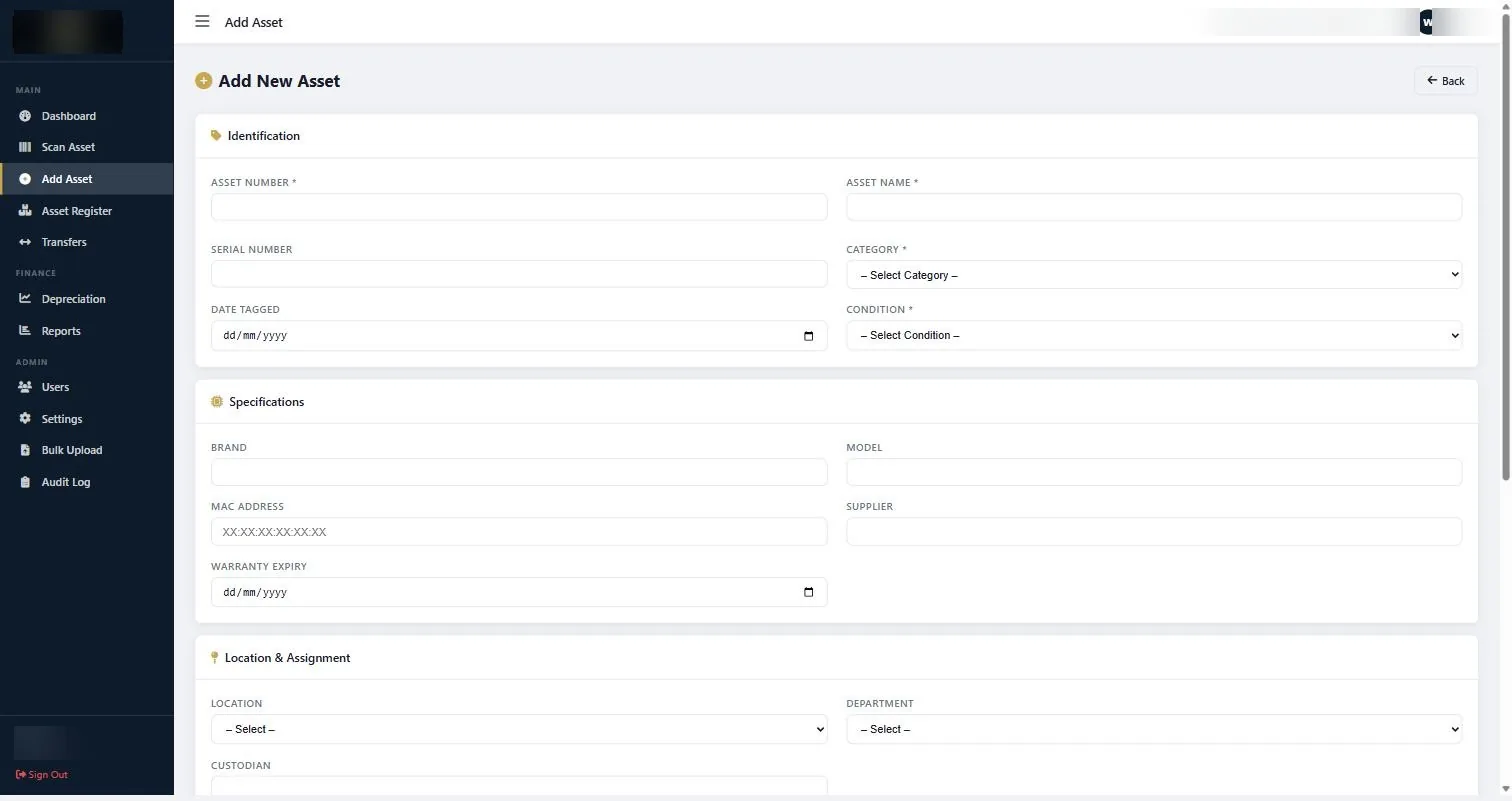
| Add Asset | Main | Capture a new asset across nineteen fields, including a photograph of the item |
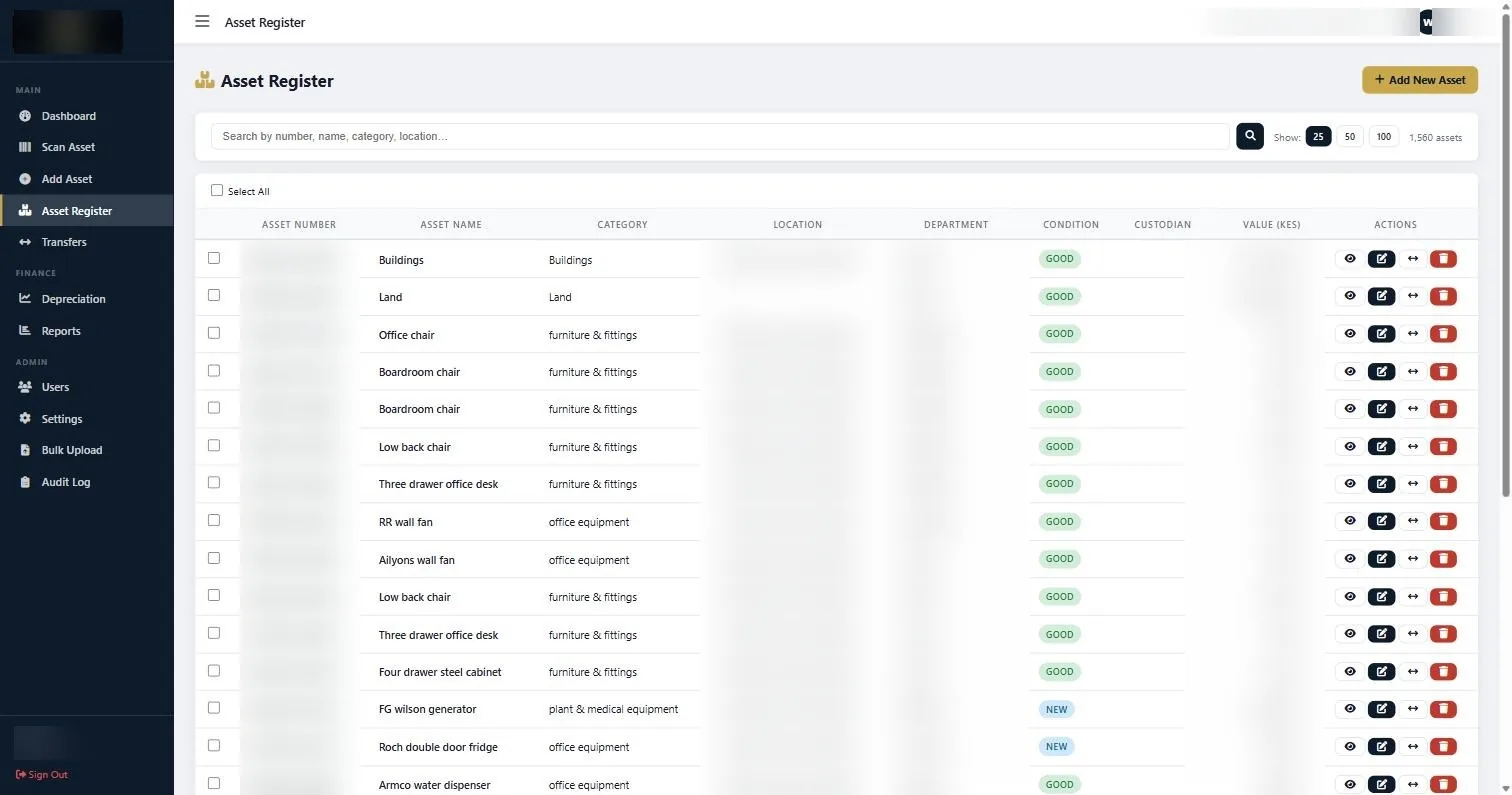
| Asset Register | Main | The full searchable register, filterable and paginated, showing asset number, name, category, location, department, condition, custodian and value |
| Transfers | Main | Move an asset between locations, departments or custodians, with the movement logged |
| Depreciation | Finance | Depreciation schedules and summaries, including quarterly views |
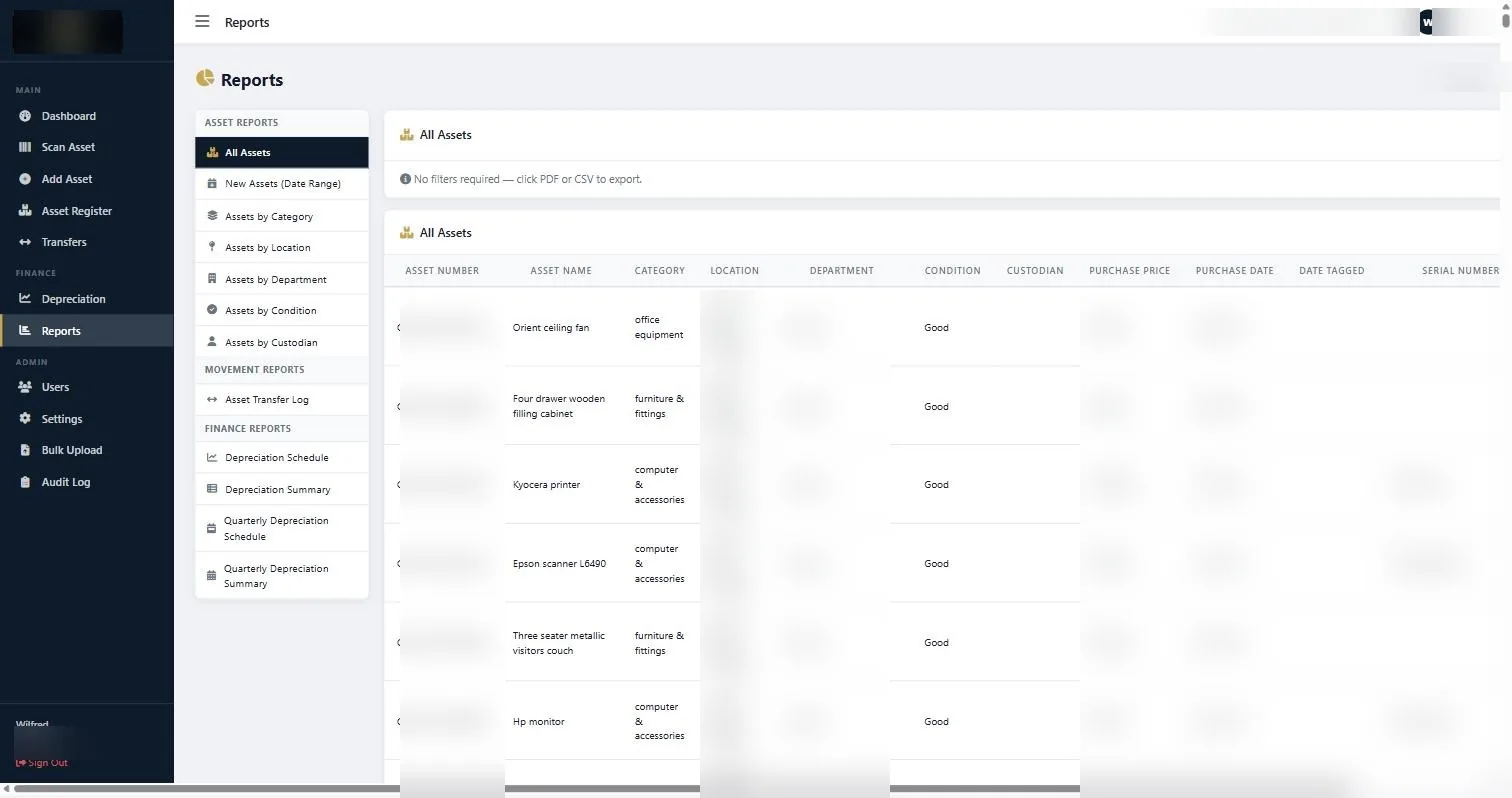
| Reports | Finance | Twelve report types across assets, movement and finance, exportable to CSV or PDF |
| Users | Admin | Staff accounts with role-based permissions |
| Bulk Upload | Admin | Import an existing register in bulk rather than keying it in |
| Audit Log | Admin | A record of who changed what and when |
What the system records per asset
Most registers capture four or five fields and stop. The gap shows up later, when someone needs to know whether a machine is still under warranty or which supplier it came from. These are the fields captured against every asset.
| Group | Fields |
|---|---|
| Identification | Asset number, asset name, serial number, brand, model, MAC address |
| Classification | Category, condition, description, notes |
| Accountability | Location, department, custodian |
| Financial | Purchase price, date of acquisition, supplier, warranty expiry |
| Tagging | Date tagged, asset image |
Twelve reports, CSV or PDF
Reporting is where a register earns its keep. Every report below is built in and exports to CSV or PDF without anyone building a spreadsheet.
| Category | Reports |
|---|---|
| Asset reports | All assets; new assets by date range; assets by category; by location; by department; by condition; by custodian |
| Movement reports | Asset transfer log |
| Finance reports | Depreciation schedule; depreciation summary; quarterly depreciation schedule; quarterly depreciation summary |
The quarterly depreciation views exist because that is the rhythm most finance teams actually report on. Being able to hand an auditor a depreciation schedule as a PDF, generated from a register where every line ties to a scannable tag, is the point of the whole exercise.
The asset management system, screen by screen
No competitor page ranking for this keyword currently shows the product working. This section is deliberately screenshot-driven so buyers can see what they are getting before they ever speak to us.
Add an asset
Enter the asset number, name, serial, category, condition, location, department, custodian, purchase price and acquisition date, attach a photograph, and save. Or skip the form entirely and import an existing register through Bulk Upload.
Work the register
The Asset Register lists everything, searchable and paginated at 25, 50 or 100 rows, showing asset number, name, category, location, department, condition, custodian and value at a glance.
Scan to verify
Open Scan Asset, point a barcode reader at any tag, and the field captures the code automatically and pulls up that asset. Print or export the record from the same screen. This is how a physical audit gets done.
Transfer and report
Move an asset between locations, departments or custodians and the transfer is logged. Then pull the depreciation schedule, transfer log or any of the twelve reports as CSV or PDF.
Asset management software vs spreadsheets
Almost every organisation starts with a spreadsheet, and for a small estate that is a reasonable choice. The point at which it stops working is fairly predictable.
| Spreadsheet | Asset management system | |
|---|---|---|
| Multiple users | Version conflicts, or one gatekeeper | Concurrent access with role-based permissions |
| Depreciation | Manual formulas, easy to break silently | Schedules and summaries generated, including quarterly |
| Physical verification | Printed list and a pen | Scan the tag, the record opens |
| Asset movement | Overwrite a cell, history lost | Transfers logged with a movement report |
| Audit trail | None. You cannot see who changed what | Audit log of every change |
| Net book value | Recalculated by hand, often stale | Current NBV on the dashboard |
| Reporting | Build each one yourself | Twelve built-in reports, CSV or PDF |
| Works well up to | Roughly 100 to 200 assets, one site | Multi-site, multi-county estates |
The honest threshold: if you have under a hundred assets in one building and one person owns the register, a spreadsheet is fine. If you are past a few hundred assets, spread across branches, or being asked for depreciation schedules by an auditor, the spreadsheet is already costing you more time than the licence would.
This is not digital asset management
Worth stating plainly, because the search terms overlap and the products do not. “Digital Asset Management” (DAM) software manages digital files: brand logos, marketing images, video libraries. It has nothing to do with physical equipment.
If you searched for a digital asset management system because you want to track laptops, furniture, vehicles or machinery, what you actually need is fixed asset management, which is this. The rule of thumb: if you can drop it, it is a fixed asset. If you can only download it, it is a digital asset.
Pricing
| Item | Cost | Includes |
|---|---|---|
| Asset Management System licence | KSh 120,000 one-time | All ten modules, unlimited staff accounts, setup and staff training |
| Monthly or annual fees | None | The licence is a one-time purchase, not a subscription |
| Asset tagging, if needed | From KSh 80 / tag | Priced separately, see asset tags |
Most organisations buy tagging and software together, because a register built from a verified physical count is worth considerably more than one imported from an old spreadsheet. Full breakdown on our pricing page. The KSh 120,000 one-time licence applies across our service area; any cross-border onboarding or travel is quoted separately.
Common questions about the asset management system
Is this a subscription?+
Can we import our existing asset register?+
What do I need to scan assets?+
Does it handle multiple locations and departments?+
Can we see who changed a record?+
What formats do reports export to?+
Is training included?+
How many users can we have?+
How to use the system
Nine step by step guides written to be followed while you are sitting in front of the screen. Start with the guide index.
If you are moving to an asset management system from a spreadsheet, migrate the register before you migrate the history. A clean list of what exists today is worth more than a complete list of everything that ever did.
Ready to get your assets under control?
Call us to discuss your organisation, or email your asset list and we’ll scope it for you.